Multi-processor
The Multi-processor components are designed for use with high performance devices, such as RXn or RZn. They are used to pass circuit signals between multiple processors on a single device. Signals are sent and received between DSPs via specialized hardware and these components.
This group includes the following components:
For the RZ2 only:
Users should be aware of the delays associated with each type of multi-processor component and keep in mind the limitations associated with them.
See Designing Multi-processor Circuits for the RZ2, for more information on multi-processor limitations and best methods.
DspAssign
Description:
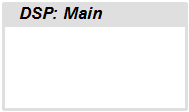
The DspAssign component is used to designate a section of an RPvdsEx sheet to run on a processor other than the one assigned to the RPvdsEx sheet. Paired with RPvdsEx macros, this component enables many multi-processor circuits to be displayed in a single sheet view. Similar to the Iterate component, components cannot intersect the DspAssign boundary.
Note
This component is for use with only high performance processor devices, such as RXn or RZn, but users must be familiar with the number of DSPs available in their device and only assign sheets to those DSPs.
MCPipeIn
MCPipeOut
Description:
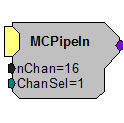
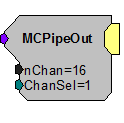
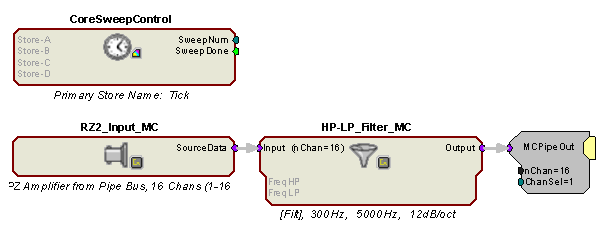
These components allow multi-channel transfer of data between processors within an RZ device. The components are used to either get data from or put data onto the RZ's Data Pipe Bus. Once the data is on the bus it is available to the other DSPs in the system. The source data available to MCPipeIn or from MCPipeOut is configured using the PipeSource component. There is a two cycle delay when transferring signals using the MCPipeIn and MCPipeOut. (This is accounted for in TDT developed macros)
For single channel transfer between processors on an RZ, use PipeIn and PipeOut.
Note
The PipeSource component must be included on any DSP that uses PipeIn, PipeOut, MCPipeIn, or MCPipeOut. Some macros, like the RZ2_Input_MC allow declaration of a PipeSource component, so that a separate PipeSource component is not needed.
Note
These components are for use with the RZ2 processor devices. Do not use them with the RZ5, RZ6, RXn or single processor devices. These components will only appear in the component list when a multi-processor device is selected in the hardware setup dialog box.
MCPipeIn
MCPipeOut
Example:
MCPipeIn/MCPipeOut
Processor 1
The RZ2_Input_MC macro acquires data directly from the RZ2's fiber optic port. Signals are carried from the PZn BioAmp across a fiber optic cable to the Optical Port and routed by the I/O interface to the Pipe Bus. Data on the Pipe Bus is available to all DSPs in groups of 128 channels via the Pipe components. The RZ2_Input_MC macro combines several Pipe components to feed the circuit with the first 16 channels of data (nChan=16) beginning with channel 1 (ChanSel=1). The RZ2_Input_MC macro handles all required data scaling when acquiring data from the PZn BioAmp. The data is filtered and then MCPipeOut makes the filtered multi-channel signal available on the pipe bus.
Note
Each DSP that includes any of the Pipe input or output components must also include the PipeSource component. This is handled internally by the RZ2_Input_MC macro.
Processor 2
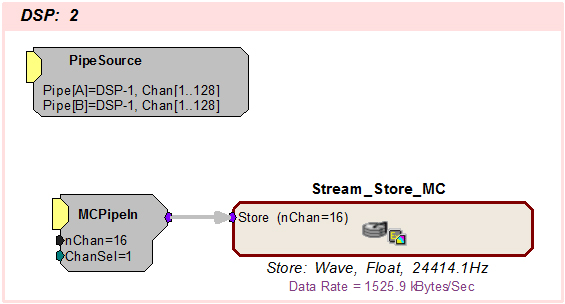
On the second processor PipeSource is used to acquire the data that DSP-1 put on the Data Pipe Bus. MCPipeIn routes the data for storage. Alternatively, this example can use the RZ2_Input_MC macro in place of the PipeSource and MCPipeIn components.
MCzHopIn
MCzHopOut
Description:
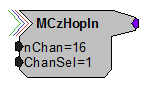
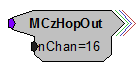
These components allow multi-channel transfer of data between processors within a device. They enable the user to distribute processing tasks across multiple processors within a multi-DSP device, such as any RXn or RZn. There is a one sample delay when transferring signals using the MCzHopOut, MCzHopIn, or MCzHopPick on an RX or two samples when using an RZ.
These components work together. Adding an MCzHopIn without the corresponding MCzHopOut (or vice versa) will produce an error. Each MCzHopOut must have a unique label. The hop label can be accessed and edited by double-clicking the component. Multiple MCzHopIns can be used with a single MCzHopOut.
Note
The MCzHopPick can be used in place of an MCzHopIn, to access a single channel from a MCzHopOut.
Use zHopIn and zHopOut for single channel transfer between processors.
Note
An RPvdsEx circuit can include a maximum of 126 zHop pairs. One zHop pair is counted for each single zHop pair and for each channel of an MCzHop pair.
Note
This component is for use with only high performance processor devices, such as RXn or RZn.
MCzHopIn
MCzHopOut
Example:
MCzHops
Processor 1
This circuit filters all 64 A/D inputs and then makes them available to any of the processors on the device.
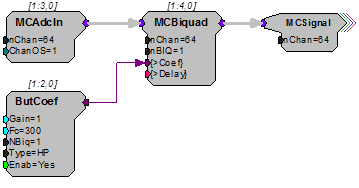
Processor 2
On a second processor the multi-channel signal is retrieved and each signal is scaled then output as a multi-channel signal. The ScaledMC HopOut is a helper that carries the signal to another part of the circuit on the same processor.

MCzHopPick
Description:
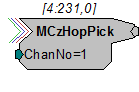
This component allows transfer of data between processors within a device, with the added advantage of being able to pick one channel to retrieve from a multi-channel signal. A MCzHopOut with the same label must also be added to the RPvdsEx file. The label can be accessed and edited by double-clicking the component.
There is a one sample delay when transferring signals using the MCzHopPick on an RX or two samples when using an RZ.
Note
This component is for use with only high performance processor devices, such as RXn or RZn.
Example:
MCzHopPick
Processor 1
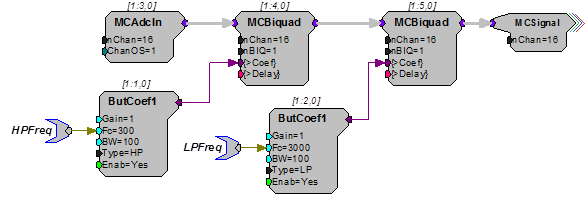
This circuit filters 16 A/D inputs and then makes them available to any of the processors on the device.
Processor 2
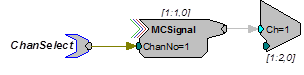
This circuit picks channel 1 out of the 16 channels of filtered signals and plays it from the analog output to allow the user to monitor any one of the recording channels. The channel number can be selected dynamically via the ChanSelect parameter tag.
PipeIn
PipeOut
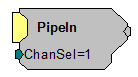
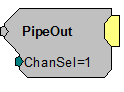
Description:
These components allow single-channel transfer of data between processors within the RZ2 processor. The components are used to either get data from or put data onto the RZ2's Data Pipe Bus. Once the data is on the bus it is available to the other DSPs in the system. The source data available to PipeIn or from PipeOut is configured using the PipeSource component. There is a two cycle delay when transferring signals using the PipeIn and PipeOut. (This delay is accounted for in TDT Developed macros.)
For multi-channel transfer between processors on an RZ2, use MCPipeIn and MCPipeOut.
Note
The PipeSource component must be included on any DSP that uses PipeIn, PipeOut, MCPipeIn, or MCPipeOut. Some macros, like the RZ2_Input_MC allow declaration of a PipeSource component, so that a separate PipeSource component is not needed.
Note
These components are for use with the RZ2 processor device. Do not use them with the RZ5, RZ6, RXn or single processor devices. These components will only appear in the component list when a multi-processor device is selected in the hardware setup dialog box.
PipeIn
PipeOut
Example:
See MCPipeIn.
PipeSource
Description:
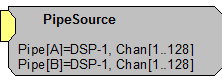
This component allows the user to configure the source data available to the DSP from the Data Pipe Bus and must be included on any DSP that uses PipeIn, PipeOut, MCPipeIn, or MCPipeOut.
Two parameters, Pipe[A] and Pipe[B] are used to select the source data. Pipe[A] represents channels 1-128 and Pipe[B] represents channels 129-256. The source data for each pipe can be the first or second 128-channel block of data from any of the DSPs in the system or the Z-Series BioAmp via the RZ2's 256-channel fiber optic port. Double-clicking on the component brings up the Edit Component Parameters dialog to change the settings.
Note
This component is for use with the RZ2 processor device. Do not use it with the RZ5, RZ6, RXn or single processor devices. The component will only appear in the component list when a multi-processor device is selected in the hardware setup dialog box.
RZ QZDSP processors rely on core-A for communication with the Pipe Bus and any associated optical port. When accessing the Pipe bus from a QZDSP, the PipeSource component must be placed on each of the cores, but only the PipeSource on core-A defines the actual source while the source in the other PipeSource components is ignored. The PipeSource component must be on each core whether it's using a pipe input, output, or both.
Pipe bus output is limited to 256 channels per QZDSP card. Users can split up groups of channels to assign to different cores, but should not assign 256 channels to more than one core.
Example:
See MCPipeIn.
zHopIn
zHopOut
Description:
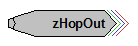
These components allow single channel transfer of signals between processors within a device. They enable the user to distribute processing tasks across multiple processors within a multi-DSP device, such as the RX5. There is a one sample delay when transferring signals using the zHopOut and zHopIn on an RX or two samples when using an RZ.
These components work together. Each zHopOut must have a unique label. Multiple zHopIns can be used with a single zHopOut. Adding a zHopIn without the corresponding zHopOut (or vice versa) will produce an error.
The hop label can be accessed and edited by double-clicking the component. For multi-channel transfer between processors, use MCzHopIn and MCzHopOut.
Note
An RPvdsEx circuit can include a maximum of 126 zHop pairs. One zHop pair is counted for each single zHop pair and for each channel of a MCzHop pair.
Note
This component is for use with only high performance processor devices, such as RXn or RZn.
zHopIn
zHopOut
Example:
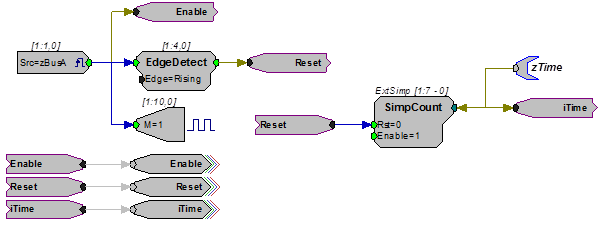
ZHops - In this example zHopOuts are used on Sheet 1 to transfer the trigger, reset, and iTime lines to Sheet 2, which has been assigned to another processor. On sheet two, the trigger lines are used to enable data storage. Notice that in this example, HopOut and HopIn (helpers) are used in coordination with the zHops. Keep in mind that, unlike the zHops, the helpers (HopIn and HopOut) do not use processor cycles or incur delays, so they can be used liberally. When multiple hops are needed on a single processor, using HopIn and HopOut helps to reduce the overall number of components in a circuit.
Sheet 1 - Main Processor
Sheet 2 - Auxiliary Processor