Device Status
Device Status components serve both to monitor and do math with major system status values. These components feed the processing chain with specific system information like DSP cycle usage or available system memory. The value can be used to compute some circuit parameter or simply to monitor system status. When using RPvdsEx a ParWatch can be used to monitor the output of a Device Status component.
This group includes the following components:
CycUsage
Description:
Feeds stream with DSP cycle usage in percent. Unpredictable behavior may be experienced when cycle usage exceeds 90%.
Important
If cycle usage is over 100% the value returned will not indicate this. For example a cycle usage of 120% will return 20%. To determine if your cycle usage is over 100% lower your sampling rate and check to see if cycUsage "increases". An increase means that the cycle usage was greater than 100%. Higher sampling rates use more cycles than lower.
Equation:
Output = 100% * DSP_Cycle_Used_Per_Second / 50,000,000
Example:
Cycle Usage
File: Examples\cycleUsage_ex.rcx
Default Device: RP2 Processor
Sampling Rate: 50 kHz
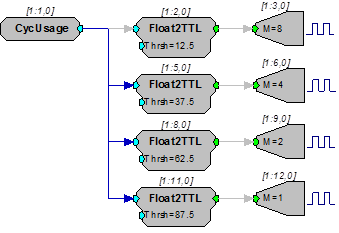
This circuit uses the four face plate LEDs found on the RP2 as a DSP cycle usage reporting meter. The CycUsage component is fed to four Float2TTL converters which have threshold settings. These settings are set to indicate activity over the levels shown. The four TTL signals are then made to control the four LEDs of the TTL output port. Notice that because Bit-0 is physically located at the top of the four LED group it is used to indicate the highest level of usage. In general, monitoring cycle usage with a parameter watch is a good way of determining the cycle usage of your system.
FreeDM
FreePM
FreeXM
Description:
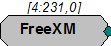
Feeds stream with amount of currently available memory of specified type. Data memory (DM) is typically used for filter delay line and short delays. Program Memory (PM) holds filter coefficients and External Memory (XM) is used for long delays and buffers.
Note
The value shown is the number of free 4-byte words (samples) rather than the number of free bytes.