Data Reduction
The Data Reduction components decrease the size of the data set at the expense of resolution.
This group includes the following components:
- CompTo16
- CompTo16D
- CompTo8
- CompTo8D
- ExpFrom16
- ExpFrom8
- PlotDec16
- ShufTo16
- ShufTo8
- SplitFrom16
- SplitFrom8
This group also includes the following components, if RPvdsEx Device Setup is configured for a high performance device, such as the RXn or RZn:
CompressTo/ExpandFrom functions take a single input and reduce it from a 32-bit value to an 8 or 16-bit value. The data is stored as a 32-bit word. For example CompTo8 stores data in one-fourth the space and has one-fourth the resolution or dynamic range (e.g. 200,000 points of data with 32-bit resolution is reduced to 50,000 with 8-bit resolution). ExpandFrom8 takes the stored data (32-bit word) and expands it into four 32-bit words for data output and manipulation.
ShuffleTo/SplitFrom functions take several inputs and reduce them from a 32-bit value to 8 or 16-bit value. The data is stored as a 32-bit word. For example ShuffleTo16 takes two inputs and reduces the resolution by one-half (16-bit). It stores the first input value in the high portion of the word and the second input in the low portion of the word. SplitFrom reverses the process. It extracts the two/four values in word format and outputs them as 32-bit words for data output and manipulation.
ReadTagVex is the ActiveX format for reading reduced data in MATLAB. Other programming languages can use either ReadTagVex or ReadTag. When using ReadTag it is necessary to write your own data splitting or expansion routines.
Data Reduction and Scale Factor
It is sometimes desirable to reduce data sets to either increase data transfer rates or reduce required memory allocation for data storage. This can be done by compressing 32-bit numbers to 16-bit numbers, or by compressing 32-bit numbers to 8-bit numbers, etc. For demonstration, we will consider converting 32-bit values to 16 bits of precision.
The largest number that can be represented with 16 bits is 65535 (216-1). If we designate one bit as a sign bit, the largest value that the remaining 15 bits can represent is 32767. Using this sign bit results in a range from -32768 to 32767. This range represents the number of discrete amplitude values available for the converted signal. The level of the signal samples in the converted signal is essentially rounded to the nearest digital value upon conversion. This process results in a quantization error. To minimize this error and produce the best resolution in the conversion, the scale factor should be set to best fit the input signal to this range. If the input waveform is known to have a voltage swing of ± 1.0 V, the scale factor should be set to 32767. If the voltage swing is ± 10 V, the scale factor should be set to 3276.7. Setting the scale factor incorrectly will result in poor resolution or meaningless data.
For example: Our range gives us 65535 divisions of the y-axes below. In the figure to the right, if we zoom in on the improperly scaled input signal (B), we can see that the quantized signal is degraded. This waveform can be represented by only 11 possible digital amplitude values. On the other hand, each sample in the properly scaled waveform (A) can take on any of the 65536 values in the entire range. This quantized waveform (blue) is a much better representation of the input waveform (red).
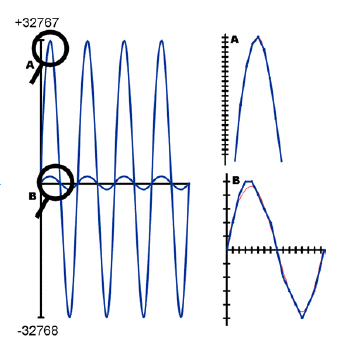
Later in the processing chain, if we convert the values back, the signals are rescaled to match their original range by using the inverse of the scale factor used earlier. The output values will have the dynamic range of the reduced data.
The process is very similar when compressing numbers to 8 bits of precision.
CompTo16
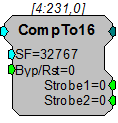
Description:
CompTo16 (compress to 16-bit) takes a stream of 32-bit floating values, scales and converts them to 16-bit fixed point numbers. Successive values are then output in the upper and lower portions of a 32-bit integer. The Strobe1 output sends a pulse high when the data is sent and should be linked to the AccEnable parameter of the buffer component.
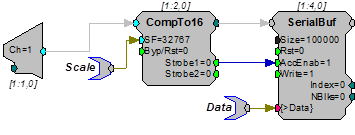
This reduction technique can be used to decrease memory allocation for data storage or double the data transfer rate to and from the PC.
The scale factor (SF) is used to appropriately scale the floating point input before it is converted to 16 bits. The range that can be specified using 16 bits is ± 32767. To get the maximum resolution, SF should be selected in such a way that the maximum input voltage scales to ± 32767. The default SF is set to 32767 and assumes that the input is bounded between ± 1.0 V. Use an SF of 3276.7 for a ± 10 V range. The SF and input values must be matched. Mismatch between the SF and input value range gives poor resolution or meaningless data. Use ExpandFrom16 to reverse the process. See Data Reduction and Scale Factor for more information on properly setting the scale factor.
CompTo16D
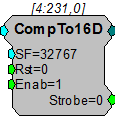
Description:
CompTo16D (compress to 16-bit) is essentially the same as CompTo16 except it allows for an enable input that ensures no data is passed through when compression is not enabled. When enabled it scales and converts a stream of 32-bit floating values to 16-bit fixed point numbers. Successive values are then output in the upper and lower portions of a 32-bit integer. The Strobe output sends a pulse high when the data is sent and should be linked to the AccEnable parameter of the buffer component. This reduction technique can be used to decrease memory allocation for data storage and double the data transfer rate to and from the PC.
Scale factor (SF) is used to appropriately scale the floating point input before it is converted to 16 bits. The largest number that can be specified using 16 bits is ± 32767. To get the maximum resolution, SF should be selected in such a way that the maximum input voltage scales to ± 32767. The default SF is 32767 and assumes that the input is bounded between ± 1.0 V. Use an SF of 3276.7 for a ± 10 V range. The SF and input values must be matched. Mismatch between the SF and input value range gives poor resolution or meaningless data. Use ExpandFrom16 to reverse the process.
See Data Reduction and Scale Factor for more information on properly setting the scale factor.
CompTo8
Description:
CompTo8 (compress to 8-bit) takes a stream of 32-bit floating values, scales and converts them to 8-bit fixed point numbers. Each value is stored in an 8-bit portion of a 32-bit integer. The Strobe1 output sends a pulse high when the data is sent and should be linked to the AccEnable parameter of the buffer component. This reduction technique can be used to decrease memory allocation or increase transfer rates.
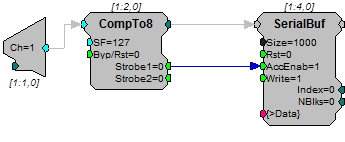
Scale factor (SF) scales the floating point value before storing in integer format. The largest number that can be specified using eight bits is ± 127. To get the maximum resolution, SF should be selected in such a way that the maximum input voltage scales to ± 127. The default SF is set to 127 and assumes that the input is bounded between ± 1.0 V. Use an SF of 12.7 for a ± 10 V range. The SF and input values must be matched. Mismatch between the SF and input values gives poor resolution or meaningless data. ExpandFrom8 reverses the process. See Data Reduction and Scale Factor for more information on properly setting the scale factor.
CompTo8D
Description:
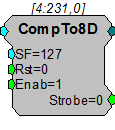
CompTo8D (compress to 8-bit) is essentially the same as CompTo8 except it allows for an enable input that ensures no data is passed through when compression is not enabled. When enabled it scales and converts a stream of 32-bit floating values to 8-bit fixed point numbers. Each value is stored in an 8-bit portion of a 32-bit integer. The Strobe output sends a pulse high when the data is sent and should be linked to the AccEnable parameter of the buffer component. This reduction technique can be used to decrease memory allocation and increase transfer rates.
Scale factor (SF) scales the floating point value before storing in integer format. The largest number that can be specified using eight bits is ± 127. To get the maximum resolution, SF should be selected in such a way that the maximum input voltage scales to ± 127. The default SF is 127 and assumes that the input is bounded between ± 1.0 V. Use an SF of 12.7 for a ±10 V range. The SF and input values must be matched. Mismatch between the SF and input values gives poor resolution or meaningless data. ExpandFrom8 reverses the process. See Data Reduction and Scale Factor for more information on properly setting the scale factor.
ExpFrom16
Description:
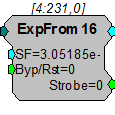
ExpFrom16 (expand from 16-bit) converts integer data at its input to floating point data at its output. It takes a stream of dual 16-bit integers and converts them into two 32-bit floating point values for output. The scale factor (SF) scales the output values and a Strobe sends a pulse high each time a 32-bit value is read by the component.
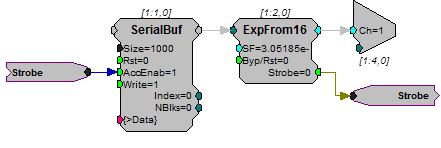
SF defines the range of the expanded data set. It can be the inverse of the scale factor value used to reduce the data. The default SF is set to 3.05185 e-05, the inverse of the default scale factor for CompTo16 (32767). Data is passed through unexpanded when Byp/Rst is set high. See Data Reduction and Scale Factor for more information on properly setting the scale factor.
ExpFrom8
Description:
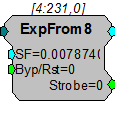
ExpFrom8 (expand from 8-bit) converts integer data at its input to floating point data at its output. It takes a stream of four 8-bit integers and converts them into four 32-bit floating point values for output. Output values have the dynamic range of the reduced data.
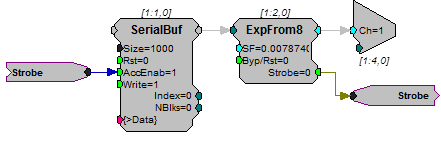
Scale factor (SF) defines the range of the expanded data set. It can be the inverse of the scale factor value used to reduce the data. The default SF is set to 0.007874, the inverse of the default scale factor for CompTo8 (127). Mismatching scale factors results in an inaccurate scaling of the data. See Data Reduction and Scale Factor for more information on properly setting the scale factor.
Strobe sends a pulse high each time a 32-bit value is loaded to the component.
PlotDec16
Description:
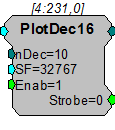
PlotDec16 tracks the max and min of the input for a set sample number (nDec), scales and then outputs the values as the lower and upper portion of a word. Data can then be stored in a memory buffer for access by a computer. Max values are stored in the upper 16-bits of the word. Min values are stored in the lower 16-bits of the word.
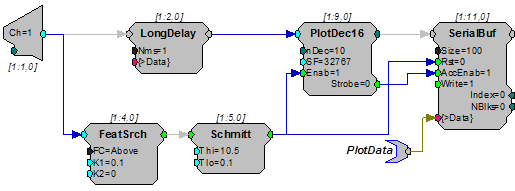
Scale factor (SF) sets the output range. For SF = 100, a ± 1.0 volt signal will have a range of ± 100. Data values can be set for a graph plot that is 200 pixels high by using a scale factor of 100 (± 100 pixels). To separate the output into the corresponding max and min values use ReadTagVEX (See the ActiveX Manual ).
Note
Because the values are stored using 16 bits, if the scaled input value exceeds ± 32767 the data can be corrupted.
MCCpTo8D
Description:
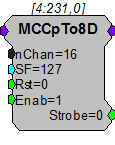
MCCpTo8D (compress to 8-bit) is the multi-channel version of CompTo8D. When enabled, the device scales and converts a stream of multi-channel 32-bit floating-point values to multi-channel 8-bit fixed-point numbers. Each value is stored in an 8-bit portion of a 32-bit integer. The Strobe output goes high when the data is available and may be used to clock the data into a buffer component. This reduction technique can be used to decrease memory allocation and increase transfer rates.
Scale factor (SF) scales the floating-point value before storing in integer format. The largest number that can be specified using eight bits is ± 127. To get the maximum resolution, SF should be selected in such a way that the maximum input voltage scales to ± 127. The default SF is 127 and assumes that the input is bounded between ± 1.0 V. Use an SF of 12.7 for a ±10 V range. The SF and input values must be matched. Mismatch between the SF and input values gives poor resolution or meaningless data. Use ExpandFrom8 on each channel of data to reverse the process. See Data Reduction and Scale Factor for more information on properly setting the scale factor.
Note
This component is for use with only high performance processor devices, such as RXn or RZn.
MCCpTo16D
Description:
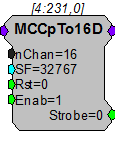
MCCpTo16D is the multi-channel version of CompTo16D (compress to 16-bit). When enabled, MCCpTo16D scales and converts a multi-channel stream of 32-bit floating-point values to multi-channel 16-bit fixed-point numbers. Successive values are then output in the upper and lower portions of a 32-bit integer. The Strobe output goes high when the data is available and may be used to clock the data into a buffer component. This reduction technique can be used to decrease memory allocation for data storage and double the data transfer rate to and from the PC.
Scale factor (SF) is used to appropriately scale the floating point input before it is converted to 16 bits. The largest number that can be specified using 16 bits is ± 32767. To get the maximum resolution, SF should be selected in such a way that the maximum input voltage scales to ± 32767. The default SF is 32767 and assumes that the input is bounded between ± 1.0 V. Use an SF of 3276.7 for a ± 10 V range. The SF and input values must be matched. Mismatch between the SF and input value range gives poor resolution or meaningless data. Use ExpandFrom16 on each channel of data to reverse the process. See Data Reduction and Scale Factor for more information on properly setting the scale factor.
Note
This component is for use with only high performance processor devices, such as RXn or RZn.
MCPDec16
Description:
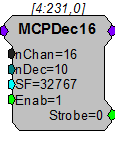
MCPDec16 is the multi-channel version of PlotDec16. It tracks the maximum and minimum values of the input for a set number of samples (nDec), scales them, and then outputs the values as the lower and upper portion of a word. Data can then be stored in a memory buffer for access by a computer. Maximum values are stored in the upper 16-bits of the word. Minimum values are stored in the lower 16-bits of the word.
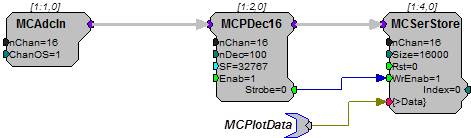
Scale factor (SF) sets the output range. For SF = 100, a ± 1.0 volt signal will have a range of ± 100. Data values can be set for a graph plot that is 200 pixels high by using a scale factor of 100 (± 100 pixels). To separate the output into the corresponding max and min values use ReadTagVEX (See the ActiveX Manual ).
Note
Because the values are stored using 16 bits, if the scaled input value exceeds ± 32767 the data can be corrupted.
Note
This component is for use with only high performance processor devices, such as RXn or RZn.
ShufTo16
Description:
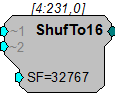
ShufTo16 takes 32-bit floating point values from two inputs, reduces each, combines them, and sends them from a single output as 32-bit integers. The top 16-bits stores the first channel and the bottom 16-bits stores the second channel. This reduction technique can be used to store data from two analog inputs for high speed transfer. At a 100 k sampling rate it is possible to stream two channels in real-time to disk.
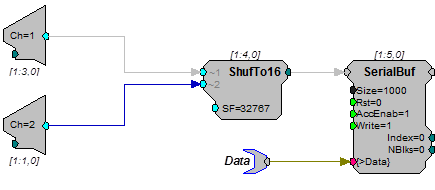
Scale factor (SF) is used to define the upper and lower limits of the signal. The largest number that can be specified using 16 bits is ± 32767. To get the maximum resolution, SF should be selected in such a way that the maximum input voltage scales to ± 32767. The default SF is set to 32767 and assumes that the input is between ± 1.0 V. Use an SF of 3276.7 for a ± 10 V range. The SF and input values must be matched. Mismatch between the SF and input values gives poor resolution or meaningless data. SplitFrom16 reverses the process.
See Data Reduction and Scale Factor for more information on properly setting the scale factor.
ShufTo8
Description:
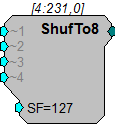
ShufTo8 (Shuffle To 8-bit) takes 32-bit floating point values from four inputs, reduces each and sends them as a 32-bit integer for output. The first 8-bits stores the first channel the second 8-bits the second and so forth. This reduction technique can be used to store data from four analog inputs for high speed transfer.
Scale factor (SF) is used to define the upper and lower limits of the signal. The largest number that can be specified using eight bits is ± 127. To get the maximum resolution, SF should be selected in such a way that the maximum input voltage scales to ± 127. The default SF is set to 127 and assumes that the input is bounded by ± 1.0 V. Use a scale factor of 12.7 for a ± 10 V range. The SF and input values must be matched. Mismatch between scale factor and input values gives poor resolution or meaningless data. SplitFrom8 reverses the process.
See Data Reduction and Scale Factor for more information on properly setting the scale factor.
Example(s):
See ShufTo16.
SplitFrom16
Description:
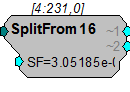
SplitFrom16 takes 32-bit integers and splits them into two 16-bit values and converts them to two floating point values for output. Output values have the dynamic range of the reduced data.
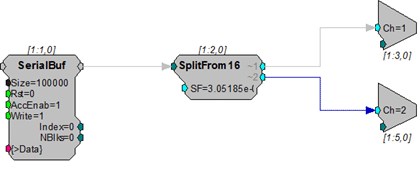
Scale factor (SF) defines the range of the shuffled data sets. It must be the inverse of the scale factor value used to shuffle the data. The default scale factor is set to 3.05185 e-05, the inverse of the default scale factor for ShufTo16 (32767). Mismatching scale factors results in inaccurate scaling of the data. See Data Reduction and Scale Factor for more information on properly setting the scale factor.
The outputs are matched to the original inputs.
SplitFrom8
Description:
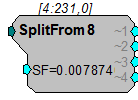
SplitFrom8 takes 32-bit integers and splits them into four 8-bit values and sends them as floating point values for output. Output values have the dynamic range of the reduced data.
Scale factor (SF) defines the range of the shuffled data sets. It must be the inverse of the scale factor value used to shuffle the data. The default SF is set to 0.007874, the inverse of the default scale factor for ShufTo8 (127). Mismatch between scale factors results in inaccurate scaling of the data. See Data Reduction and Scale Factor for more information on properly setting the scale factor.
The channel output matches the original channels for input.
Example:
See SplitFrom16.