iCon Group I/O
iCon Tab
When you have several iCon Inputs or iCon Outputs of the same type, for example an arena with several nose pokes and speaker outputs, it is easier and more efficient to combine the inputs and outputs into 'groups'. Groups allow you to make experimental changes faster and write simpler Python code to send/receive events from a large number of i/o.
All of the Logic Input Processor options are available for an input group except for Epoc Store. All of the Logic Output Processor options are available for an output group except Combine Control, Hal Input Port, and Epoc Store.
See iCon Design Interface for more information on setting up groups. You can define up to 8 groups. Supported devices include: iHn, iLn, iMn, iRn, iS9 touch inputs, and iV2 region tracking signal outputs.
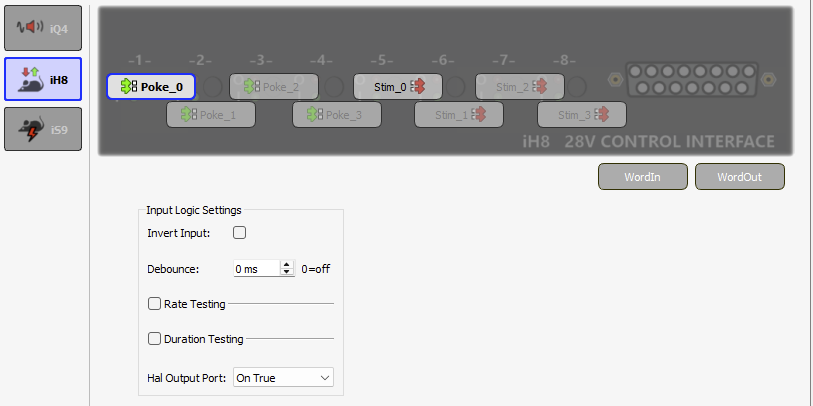 |
| Group Inputs and Outputs |
Run-time Interface
The run-time interface has a button LED for each input and output that shows its current state.
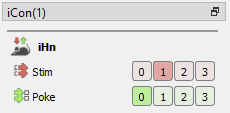 |
| iHn Group Run-Time Interface |
For the iMn modules, additional options that are available during design-time can also be modified during run-time for each output in the group.
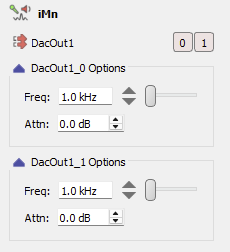 |
| iMn Group Output Run-Time Interface |
Click on the input name to manually trigger it. Click an output to manually toggle its state on/off. Hold down CTRL and click an i/o button to 'mute' it. This prevents inputs from triggering Pynapse events or Pynapse from triggering the output.
Slot Methods for Responding to Input States
These input slots capture status information about the group inputs. They are available as method definitions inside Pynapse states for each group. Write a method with this name to react to the corresponding event. The function also returns the zero-based index of the member of the group that triggered this event.
Note
The name of each slot method ('Input1' above) gets replaced with the name of your actual input, so if you name the input 'NosePoke' then s_NosePoke_rise(index) is an available slot.
Example
Move through behavioral states based on status of the third member of the 'MyInput' group
class PreTrial:
    def s_MyInput_rise(index):
        if index == 2:
            p_State.switch(StartTrial)

class StartTrial:    # StateID = ?
    def s_MyInput_active(index):
        if index == 2:
            p_State.switch(ActiveState)

    def s_MyInput_fall(index):
        if index == 2:
            p_State.switch(PreTrial)

class ActiveState:    # StateID = ?
    def s_MyInput_pass(index):
        if index == 2:
            p_State.switch(PassState)

    def s_MyInput_fail(index):
        if index == 2:
            p_State.switch(FailState)
Input Methods
All input methods have the form p_Rig.{INPUT_NAME}.{METHOD}. Type p_ in the
Pynapse Code Editor and let the code completion do the work for you. The name of each
method gets replaced with the name of your actual input group, so if you name the input
group 'NosePoke' then p_Rig.NosePoke.isOn(idx=-1) is an available method.
The idx function input is the index into the group and is zero-based. If you want to
check the status of the third input of the NosePoke group, use p_Rig.NosePoke.isOn(idx=2).
If you want to check the status of all inputs in the NosePoke group, use
p_Rig.NosePoke.isOn(idx=-1). This returns a list object of True or False, one item for
each member in the group. You can use the built-in any and all functions on this list
to check group status, for example, this conditional will return true if any of the NosePoke
inputs in the group are currently on:
if any(p_Rig.NosePoke.isOn(idx=-1)):
    print('on')
Input groups also have a count function that will return the number of inputs or outputs
in the group if you need to iterate over them:
for i in range(p_Rig.Poke.count()):
    print('group member', i)
Input Duration Settings
setActTime
p_Rig.MyInput.setActTime(acttime_sec, idx=-1)
Override the duration test 'Time to Active' setting. This is only available if 'Duration Testing' is enabled on the input.
Example
Modify the timing test based on performance.
def s_State_enter():
    # if more than 5 successful trials, increase the time to active for all group members by 50 ms.
    if p_Metric.success.read() > 5:
        p_Metric.active_time.inc(delta=0.05)
        p_Rig.MyInput.setActTime(p_Metric.active_time.read(), idx=-1)
setPassTime
p_Rig.MyInput.setPassTime(passtime_sec, idx=-1)
Override the duration test 'Time to Pass' setting. This is only available if 'Duration Testing' is enabled on the input.
Example
Modify the timing test based on performance.
def s_State_enter():
    # if more than 5 successful trials, increase the time to pass for all group members by 50 ms.
    if p_Metric.success.read() > 5:
        p_Metric.pass_time.inc(delta=0.05)
        p_Rig.MyInput.setPassTime(p_Metric.pass_time.read(), idx=-1)
setRateThresh
p_Rig.MyInput.setRateThresh(ratethr_hz, idx=-1)
Override the rate testing 'Rate Threshold' setting. This is only available if 'Rate Testing' is enabled on the input.
Example
Modify the rate threshold based on performance.
def s_State_enter():
    # if more than 5 successful trials, increase the rate threshold for all members by 1 Hz.
    if p_Metric.success.read() > 5:
        p_Metric.rate_thresh.inc()
        p_Rig.MyInput.setRateThresh(p_Metric.rate_thresh.read(), idx=-1)
Input Manual Control
Manually turn group inputs on, off, or pulse during runtime. Useful for debugging.
manualOn
p_Rig.MyInput.manualOn(idx=-1)
Manually turn on the input.
Example
Turn on the second group input when entering a state.
def s_State_enter():
    p_Rig.MyInput.manualOn(idx=1)
manualOff
p_Rig.MyInput.manualOff(idx=-1)
Manually turn off the input.
Example
Turn off all group inputs when exiting a state.
def s_State_exit():
    p_Rig.MyInput.manualOff(idx=-1)
manualPulse
p_Rig.MyInput.manualPulse(idx=-1)
Manually pulse the input.
Example
Pulse the first group input when entering a state.
def s_State_enter():
    p_Rig.MyInput.manualPulse(idx=0)
setMute
p_Rig.MyInput.setMute(muted=1, idx=-1)
Mute the group input so it can't trigger, or unmute it.
Input Status
Get information on the current state of the input.
isOn
p_Rig.MyInput.isOn(idx=-1)
Returns true if the group input is currently true.
Example
When entering a state, check if the third input in the group is already true.
def s_state_enter():
    if p_Rig.MyInput.isOn(idx=2):
        print('MyInput 3 is on')
    else:
        print('MyInput 3 is off')
isOff
p_Rig.MyInput.isOff(idx=-1)
Returns true if the group input is currently false.
Example
When entering a state, check the status of the second input in the group.
def s_state_enter():
    if p_Rig.MyInput.isOff(idx=1):
        print('MyInput 2 is off')
    else:
        print('MyInput 2 is on')
getStatusBits
p_Rig.MyInput.getStatusBits(idx=1)
Read the current state of a group input as a bitwise integer value. This is used by the Pynapse polling loop. The bit order is:
iMn Input Settings
The iMn modules have analog inputs that are converted to logic signals. These functions override the analog-to-logic conversion settings at runtime. See iMn Input Processor for more information.
setProcLowPass
p_Rig.MyInput.setProcLowPass(hz, idx=-1)
Set the Lowpass Frequency of a group input, in Hertz. This is only available if Processing mode is Complex and 'Frequency Range' is not 'Unlimited'.
setProcHighPass
p_Rig.MyInput.setProcHighPass(hz, idx=-1)
Set the Highpass Frequency of a group input, in Hertz. This is only available if Processing mode is Complex and 'Frequency Range' is not 'Unlimited'.
setProcGain
p_Rig.MyInput.setProcGain(v, idx=-1)
Set the input gain on the signal of a group input, in dB. This is only available if Processing mode is Simple or Complex. See iMn Input Processor for more information.
setProcThresh
p_Rig.MyInput.setProcThresh(v, idx=-1)
Set the input threshold of a group input, in percent. This is only available if Processing mode is Simple or Complex. See iMn Input Processor for more information.
setProcHistReduce
p_Rig.MyInput.setProcHistReduce(v, idx=-1)
Set the hysteresis reduction of a group input, in percent. This is only available if Processing mode is Simple or Complex. See iMn Input Processor for more information.
setProcSmooth
p_Rig.MyInput.setProcSmooth(ms, idx=-1)
Change the smoothing filter applied to the group input signal before it goes through the logic conversion. This is only available if Processing mode is Complex. See iMn Input Processor for more information.
Output Methods
All output methods have the form p_Rig.{OUTPUT_NAME}.{METHOD}. Type p_ in the
Pynapse Code Editor and let the code completion do the work for you. The name of each
method gets replaced with the name of your actual output group, so if you name the
output group 'Reward' then p_Rig.Reward.fire(idx=-1) is an available method.
The idx function input is the index into the group and is zero-based. If you want to
fire the third output of the Reward group, use p_Rig.Reward.fire(idx=2).
If you want to check the status of all outputs in the Reward group, use
p_Rig.Reward.isOn(idx=-1). This returns a list object of True or False, one item for
each member in the group. You can use the built-in any and all functions on this list
to check group status, for example, this conditional will return true if any of the Reward
outputs in the group are currently on:
if any(p_Rig.Reward.isOn(idx=-1)):
    print('on')
Output groups also have a count function that will return the number of inputs or outputs
in the group if you need to iterate over them:
for i in range(p_Rig.Reward.count()):
    print('group member', i)
Output Manual Control
Manually turn outputs on, off, or fire a pulse waveform during runtime. Useful for stimulus / reward presentation.
fire
p_Rig.MyOutput.fire(idx=-1)
This is only available if Triggered Pulse is selected.
Quickly pulse the output. If Duration is non-zero, the output will stay high for that set duration. Set Duration to zero to trigger a single sample pulse.
Example
Trigger an output on the second group member when the input goes high.
class Always:   #StateID = 0

    def s_MyInput_pass():
        p_Rig.MyOutput.fire(idx=1)
turnOn
p_Rig.MyOutput.turnOn(idx=-1)
Turn the output on indefinitely. This is only available if Triggered Pulse is not selected.
Example
Link a grouped input status to a grouped output.
class Always:   #StateID = 0

    def s_MyInput_rise(index):
        p_Rig.MyOutput.turnOn(idx=index)

    def s_MyInput_fall(index):
        p_Rig.MyOutput.turnOff(idx=index)
turnOff
p_Rig.MyOutput.turnOff(idx=-1)
Turn the output off. This is only available if Triggered Pulse is not selected.
Example
Link a grouped input status to a grouped output.
class Always:   #StateID = 0

    def s_MyInput_rise(index):
        p_Rig.MyOutput.turnOn(idx=index)

    def s_MyInput_fall(index):
        p_Rig.MyOutput.turnOff(idx=index)
setMute
p_Rig.MyOutput.setMute(muted=1, idx=-1)
Mute the output so it can't trigger, or unmute it.
Output Duration Settings
setDuration
p_Rig.MyOutput.setDuration(dur_sec, idx=-1)
Override the output Duration setting. This is only available if Triggered Pulse is enabled and Duration is greater than 0.
Example
Modify the pulse shape and output value based on performance.
def s_State_enter():
    # if more than 5 successful trials, decrease the output pulse time on the first group output by 50 ms.
    if p_Metric.success.read() > 5:
        p_Metric.pulse_dur.dec(delta=0.05)
        p_Rig.MyOutput.setDuration(p_Metric.pulse_dur.read(), idx=0)
Output Status
Get information on the current state of the output.
isOn
p_Rig.MyOutput.isOn(idx=-1)
Returns true if the output is currently true.
Example
When entering a state, check if any output is already true.
def s_state_enter():
    if any(p_Rig.MyOutput.isOn(idx=-1)):
        print('At least one MyOutput is on')
    else:
        print('MyOutput is off')
isOff
p_Rig.MyOutput.isOff(idx=-1)
Returns true if the output is currently false.
Example
When entering a state, check the status of the third output in the group.
def s_state_enter():
    if p_Rig.MyOutput.isOff(idx=2):
        print('MyOutput is off')
    else:
        print('MyOutput is on')
iMn Output Settings
The iMn has analog outputs. These functions override the analog output settings at runtime. See iMn Analog Outputs for more information.
Note
Dynamic Modulation and Mixing and Control settings are not available in iMn grouped analog outputs
setAtten
p_Rig.MyOutput.setAtten(v, idx=-1)
Set the output Attenuation, in dB. This is only available if Waveform Shape is User, Tone, White Noise, Pink Noise, Square, Clock, or PWM.
setFreq
p_Rig.MyOutput.setFreq(v, idx=-1)
Set the output Frequency, in Hertz. This is only available if Waveform Shape is Tone, Square, or Clock.
setVolt
p_Rig.MyOutput.setVolt(v, idx=-1)
Set the output voltage, in Volts. This is only available if Waveform Shape is DC Voltage.
setDutyCycle
p_Rig.MyOutput.setDutyCycle(v, idx=-1)
Set the duty cycle percentage, from 0 to 100. This is only available if Waveform Shape is PWM.