iPac Boot Issue
Tech Note: TN2604
Product: iPac
Version: All
Date Added: 2026-10-06
Issue
The shared drive on the iPac is inaccessible or prompts the user for a password when accessed.
Solution
The shared drive can be remounted by manually running the "Connect iPac Shared Drive" task in the Task Scheduler.
The Windows Task Scheduler can be found by typing Task Scheduler into the start menu. Right click on the "Connect iPac Shared Drive" task in the list and select "Run" from the dropdown menu.
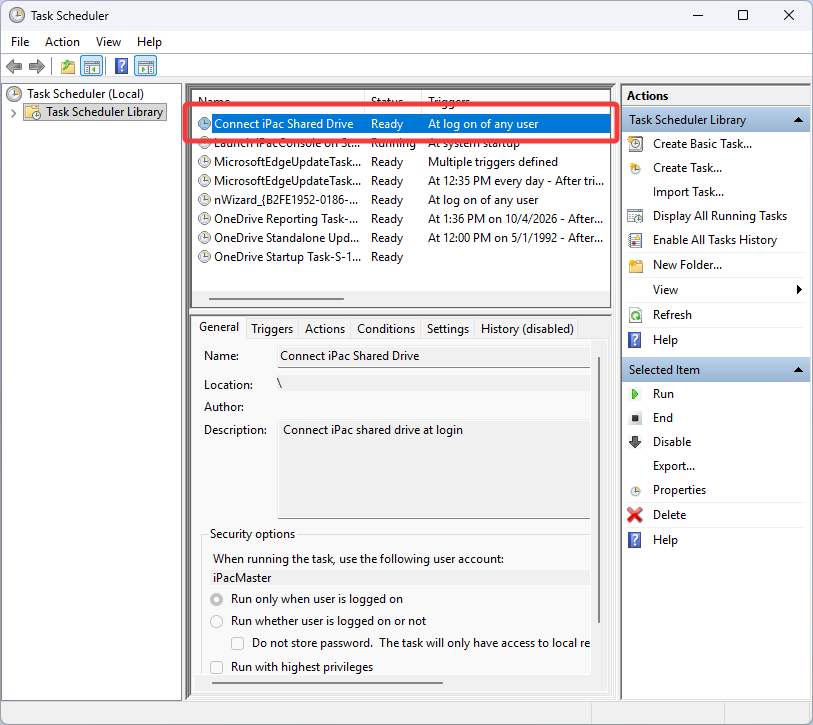
The shared drive can also be accessed manually in Windows Explorer by navigating to \\ipachost\Shared with the following credentials
-
user: ipacuser
-
password: tdt