PP16 Patch Panel

The PP16 Patch Panel provides convenient BNC connections for easy access to the digital and analog inputs and outputs of a variety of System 3 devices. Originally designed for use with the RP2.1 Real-time Processor, RA16 Medusa Base Station, and RV8 Barracuda, the PP16 back edge is equipped with a nine pin and three 25-pin connectors, which have been marked with the corresponding device label.
To connect the PP16 to a device:
Connect the male end of the 25-pin ribbon cable to the desired module and connect the female end to the correct PP16 input according to the following table.
 |
| PP16 Device Connectors |
PP16 Device Connectors and supported devices:
Mapping the Inputs and Outputs for Each Device
Each device has a unique input and output configuration. The table below shows the configuration of the BNC connectors.
The PP16 can also be used with the RX and RZ devices; however, the PP24 Patch Panel is recommended.
Mapping RA16BA I/O
The diagram below maps the RA16BA Digital I/O connection to the PP16.
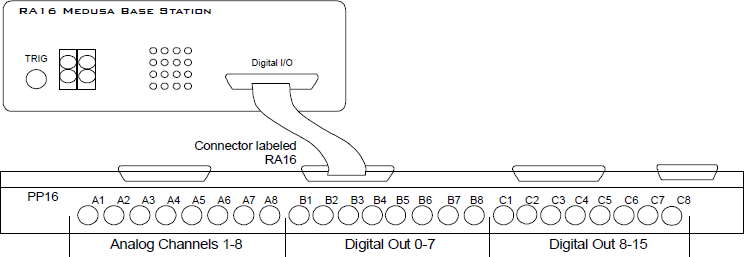 |
| RA16BA to PP16 Connection Diagram |
Mapping RP2/RP2.1 I/O
The diagram below maps the RP2.1 Digital I/O connection to the PP16. The last seven BNC connectors are not used. BNC C1 maps to VCC 3.3.
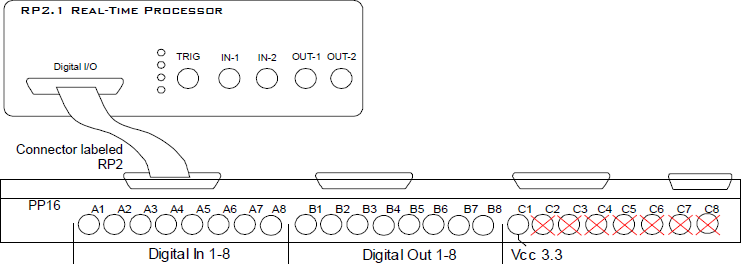 |
| RP2.1 to PP16 Connection Diagram |
Mapping RA8GA
A PP16 patch panel can be used to simplify connection to the preamplifier's analog inputs. A ribbon cable can be connected from the RA8GA Analog I/O connector to the RA16 connector on the back of the PP16 allowing acquisition of signals via the first eight BNC connectors on the front of the PP16.
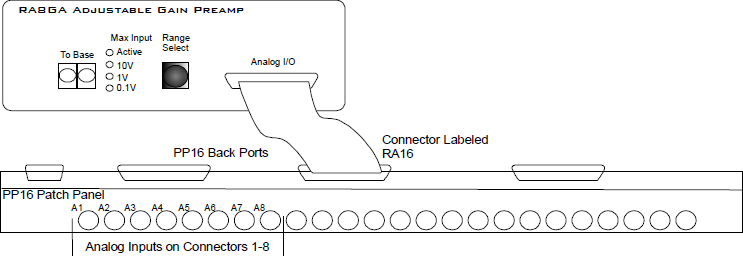 |
| RA8GA to PP16 Connection Diagram |
Mapping PM2R I/O
The diagram below maps the PM2R signal out connection to the PP16.
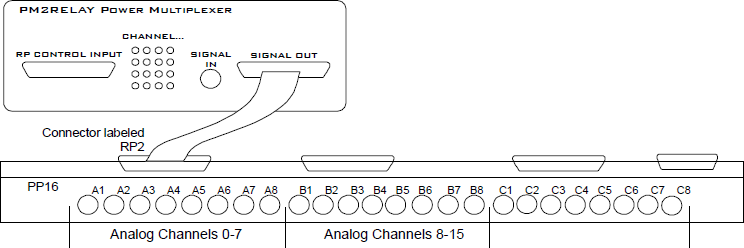 |
| PM2R to PP16 Connection Diagram |
Mapping SA8 Analog Outputs
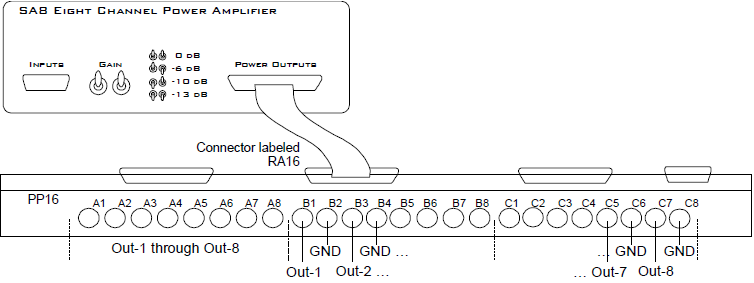 |
| SA8 to PP16 Connection Diagram |